




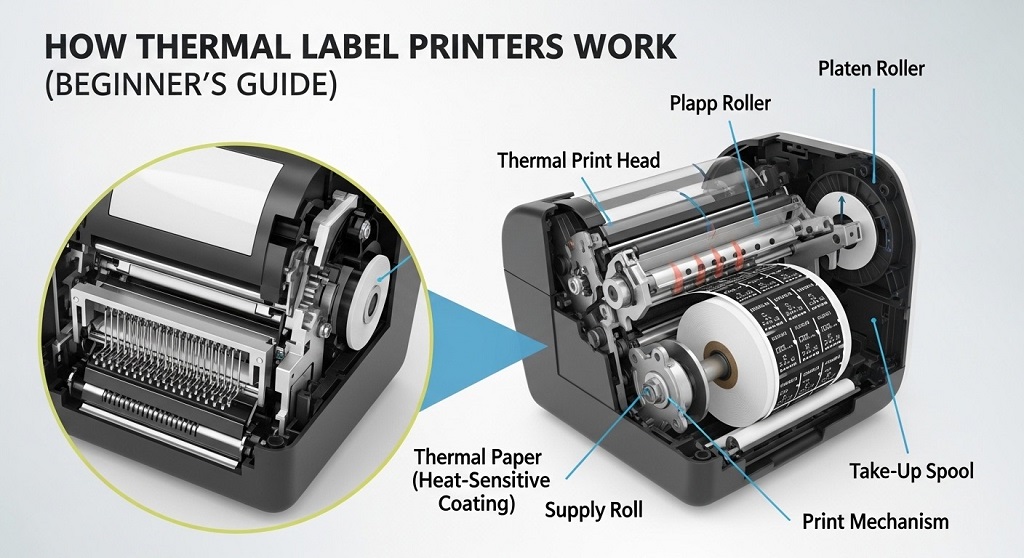
A thermal label printer is a device that creates labels using heat instead of ink or toner. It prints by activating special heat-sensitive paper or a thermal transfer ribbon. This makes it faster, simpler, and more cost-effective than traditional inkjet or laser printers for label printing tasks.
If you run an eCommerce store, warehouse, retail shop, or shipping operation, printing labels is not optional. Every package needs a scannable barcode. Every product needs identification. Every return needs tracking. Ink cartridges run out. Toner costs add up. Smudges slow down fulfillment.
Thermal printing solves these problems. No ink. No toner. Fewer moving parts. Faster output.
According to multiple logistics case studies in warehouse automation reports, businesses that switch from inkjet to a direct thermal printer reduce label-related downtime and consumable costs by up to 30–40% annually. That is not marketing hype. It is operational efficiency.
This guide explains how thermal label printers work, how a shipping label setup functions, and which option is right for beginners. Simple explanations. Practical examples. No fluff.
How Does a Direct Thermal Printer Work?
A direct thermal printer works by applying heat directly to chemically coated thermal paper, which turns black where heated.
There is no ink involved. The printer head contains tiny heating elements. When activated, they heat specific areas of the paper. The coating reacts to heat and produces text, barcodes, or images.
Step-by-Step Breakdown
- The label roll feeds through the printer.
- The thermal print head presses against the paper.
- Electrical signals heat selected dots on the print head.
- The heat triggers a chemical reaction on the paper.
- The printed label exits the machine.
That is it. Simple physics and chemistry.
Why Is This Important for Shipping Label Setup?
Shipping labels do not need to last for years. They need to survive transit. Most packages reach customers within days. A direct thermal printer is ideal for this short-term application.
Because there is no ribbon or cartridge, setup is easier. Insert the thermal label roll. Adjust alignment. Connect to your system. Print.
For beginners setting up a home-based online store, this simplicity reduces technical friction.
What Is the Difference Between Direct Thermal and Thermal Transfer Printing?
Direct thermal printing uses heat-sensitive paper. Thermal transfer printing uses a heated ribbon to transfer ink onto labels.
| Feature | Direct Thermal Printer | Thermal Transfer Printer |
|---|---|---|
| Ink Required | No | Yes (Ribbon) |
| Label Durability | Short-term | Long-term |
| Best For | Shipping labels | Product labels, asset tags |
| Resistance to Heat/Sunlight | Low | High |
When Should Beginners Choose Direct Thermal?
If your main goal is shipping label setup for platforms like Amazon, Shopify, Etsy, or courier systems, direct thermal is usually enough.
When Is Thermal Transfer Better?
If you need long-lasting barcode labels for inventory management, outdoor use, chemical containers, or industrial environments, thermal transfer is more reliable.
In logistics industry case reviews, warehouses storing inventory longer than 6 months prefer thermal transfer due to better durability.
What Components Make a Thermal Label Printer Work?
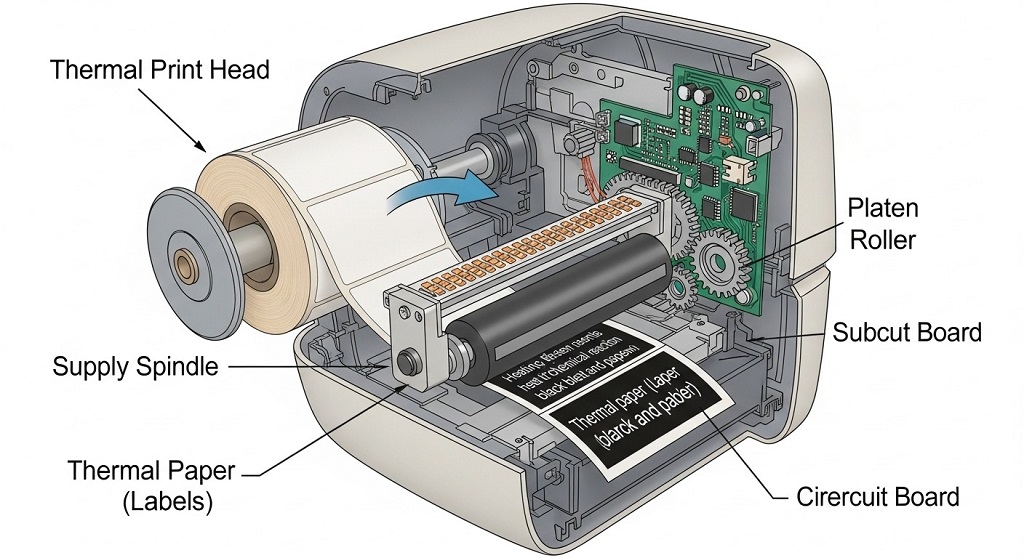
Three main components power a thermal printer: the print head, platen roller, and controller board.
1. Thermal Print Head
This is the core component. It contains hundreds of microscopic heating dots. Resolution is measured in DPI (dots per inch). Common resolutions include 203 DPI and 300 DPI.
- 203 DPI – Standard shipping labels
- 300 DPI – Smaller barcodes or detailed graphics
2. Platen Roller
This rubber roller pushes the label paper against the heated print head. It ensures consistent pressure and clear printing.
3. Controller Board
This processes the digital file sent from your computer or POS system. It translates barcode data into heating instructions.
Modern printers support USB, Bluetooth, Wi-Fi, or Ethernet connections. For a basic shipping label setup, USB connectivity is usually enough.
How Do You Set Up a Shipping Label Setup for Beginners?
A shipping label setup requires connecting the printer, installing drivers, loading labels, and calibrating the print size.
Step 1: Connect the Printer
- Plug into power.
- Connect via USB or Wi-Fi.
- Install manufacturer drivers.
Step 2: Load Thermal Labels
Open the lid. Place the roll properly aligned. Adjust guides to prevent shifting.
Step 3: Calibrate the Printer
Most printers include an auto-calibration button. This ensures proper label spacing and prevents misalignment.
Step 4: Configure Label Size
Standard shipping label size is 4×6 inches. Set this dimension in:
- Shipping software
- Courier dashboard
- Print settings panel
Incorrect sizing causes cut-off barcodes. Always verify print preview before bulk printing.
Why Are Thermal Printers Popular in eCommerce and Warehousing?
Thermal printers are popular because they are fast, cost-efficient, and reliable under high-volume use.
Speed
Most desktop thermal printers print 4–6 inches per second. That means a 4×6 shipping label prints in under 2 seconds.
Lower Maintenance
No ink cartridges. No toner. Fewer internal components.
Industry logistics case data shows maintenance incidents drop significantly when businesses replace ink-based label printing systems with direct thermal printers.
Consistent Barcode Quality
Barcodes must be readable by scanners. Smudged ink causes scanning errors. Thermal prints are sharp and consistent.
What Are the Advantages and Limitations of a Direct Thermal Printer?
Direct thermal printers are cost-efficient and simple but produce labels that fade over time.
Advantages
- No ink or toner cost
- Simple shipping label setup
- Faster printing speed
- Compact design
Limitations
- Labels fade under heat or sunlight
- Not ideal for long-term storage
- Paper must be heat-sensitive
If labels are exposed to extreme heat (e.g., inside vehicles in hot climates), fading can occur. For most parcel shipping, this is not an issue.
How Much Does It Cost to Operate a Thermal Label Printer?
Operating costs mainly include label rolls and occasional print head replacement.
There are no recurring ink expenses. A roll of 4×6 thermal labels typically prints 500 labels. Bulk pricing reduces cost per label significantly.
Print heads typically last hundreds of thousands of inches of printing. Proper cleaning extends lifespan.
Cost Comparison Example
In small eCommerce operations printing 1,000 labels monthly:
- Inkjet cost: Includes ink cartridge replacement every few months.
- Direct thermal cost: Only label roll expense.
Operational audits show annual savings when switching to direct thermal in moderate-volume shipping environments.
How Do You Maintain a Thermal Printer Properly?
Regular cleaning prevents print head damage and ensures consistent barcode quality.
Maintenance Checklist
- Clean print head with isopropyl alcohol.
- Remove dust from rollers.
- Use high-quality thermal labels.
- Avoid touching print head surface.
Routine maintenance takes less than five minutes and prevents costly downtime.
Are Thermal Printers Suitable for Small Businesses?
Yes. Thermal printers are ideal for small businesses because they simplify shipping and reduce ongoing costs.
Home-based sellers, dropshippers, warehouse managers, and retail stores benefit from a straightforward shipping label setup.
If your daily shipment volume exceeds 20 packages, switching to a direct thermal printer usually saves time and improves workflow efficiency.
Conclusion: Is a Thermal Label Printer Worth It?
A thermal label printer is not just a device. It is an operational upgrade.
If you print shipping labels regularly, the switch from ink-based printing to a direct thermal printer reduces friction. Setup is simple. Maintenance is minimal. Output is consistent.
For beginners building an online store, investing in the right shipping label setup improves delivery accuracy and customer experience.
Evaluate your volume. Choose the right label type. Maintain it properly. Then scale.
Ready to streamline your shipping workflow? Start with a reliable direct thermal printer and optimize your label setup today.
Frequently Asked Questions (FAQs)
1. Do thermal printers need ink?
No. A direct thermal printer does not use ink or toner. It uses heat-sensitive paper.
2. How long do thermal labels last?
Direct thermal labels last several months under normal storage but may fade with heat or sunlight exposure.
3. What is the standard size for shipping labels?
The most common shipping label size is 4×6 inches.
4. Can I use regular paper in a thermal printer?
No. Direct thermal printers require special heat-sensitive thermal paper.
5. Is a 203 DPI printer enough for barcodes?
Yes. 203 DPI is sufficient for most standard shipping barcodes.
6. How often should I clean the print head?
Clean it after every label roll change or at least once per month in regular use.
Related Topics: How to Maintain an Aquarium Air Pump for Long-Term Use
What Next: What to Put in Front of Window in Living Room: The Ultimate Guide to Styling Your Space





+ There are no comments
Add yours